
Classes and Objects
Start here In this course we will build our own data structures — stacks, queues, heaps, trees. To build them, we need classes. A class lets us bundle some data together with the functions that work on that data, and hide the inner details from the user.
Abstract data type (ADT)
An abstract data type is described by two things:
- What information it stores.
- Which functions are allowed to work on that information.
Example — a stack: stores items; last in, first out. Only two main functions: push() (put an item on top) and pop() (take the top item off). Think of a pile of plates.
The important idea: separate the public specification from the private implementation.
| Public specification (the "what") | Private implementation (the "how") | |
|---|---|---|
| Who sees it | The user of the data type | Only the programmer who builds it |
| Stack example | push(x) and pop() behave last-in-first-out | Stored in a Python list? Linked nodes? The user doesn't care |
Everyday example: A TV remote. You know the buttons (public): power, volume, channel. You don't need to know the circuit inside (private). The company can change the circuit and you won't even notice.
Class vs object
| Word | Meaning | Everyday example |
|---|---|---|
| Class | A template (blueprint): how data is stored and which functions work on it | The cookie cutter |
| Object | One real instance made from the template | Each cookie you cut out |
From one class we can make many objects, each with its own values.
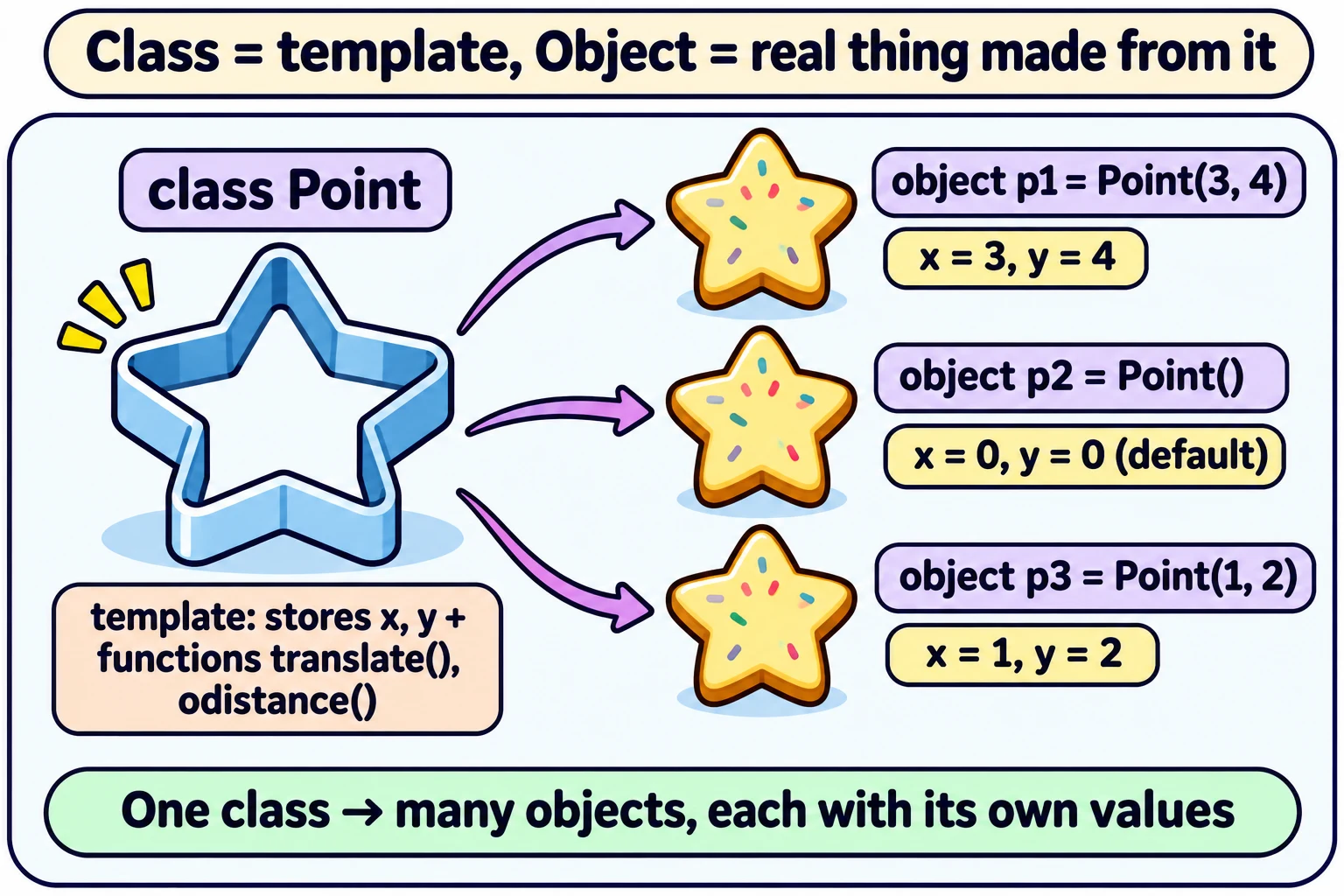
Example: a 2D point
A point has coordinates (x, y).
import math

class Point:
    def __init__(self, a=0, b=0):
        self.x = a
        self.y = b

    def translate(self, deltax, deltay):
        self.x += deltax
        self.y += deltay

    def odistance(self):
        d = math.sqrt(self.x*self.x + self.y*self.y)
        return d
Let us understand every part:
| Part | Meaning |
|---|---|
class Point: | Start the template named Point. |
__init__ | The constructor. Runs automatically when you create an object. It sets the starting values. |
self | The first parameter of every method. It means "this particular object". self.x = this point's x. |
a=0, b=0 | Default values. Point() with nothing given makes the point (0, 0). |
translate | Moves (shifts) the point: (x, y) → (x + Δx, y + Δy). |
odistance | Distance from the origin (0, 0): d = √(x² + y²). |
Using it:
p = Point(3, 4)          # p.x = 3, p.y = 4
p.odistance()            # √(3×3 + 4×4) = √(9 + 16) = √25 = 5.0
p.translate(1, 2)        # now p.x = 3 + 1 = 4, p.y = 4 + 2 = 6
q = Point()              # q is (0, 0) — default values
Same interface, different inside — polar coordinates
A point can also be stored as (r, θ): the distance r from the origin and the angle θ from the x-axis.
- r = √(x² + y²)
- θ = tan⁻¹(y / x)
- and back again: x = r cos θ, y = r sin θ
import math

class Point:
    def __init__(self, a=0, b=0):
        self.r = math.sqrt(a*a + b*b)
        if a == 0:
            self.theta = math.pi/2
        else:
            self.theta = math.atan(b/a)

    def odistance(self):
        return self.r                     # distance is just r — very easy now!

    def translate(self, deltax, deltay):
        x = self.r * math.cos(self.theta) # convert to (x, y)
        y = self.r * math.sin(self.theta)
        x += deltax                       # shift
        y += deltay
        self.r = math.sqrt(x*x + y*y)     # convert back to (r, θ)
        if x == 0:
            self.theta = math.pi/2
        else:
            self.theta = math.atan(y/x)
The big lesson: the user still writes Point(3, 4), p.translate(1, 2), p.odistance() — exactly the same as before. The inside changed from (x, y) to (r, θ), but the interface did not change. The user does not need to know which one is used.
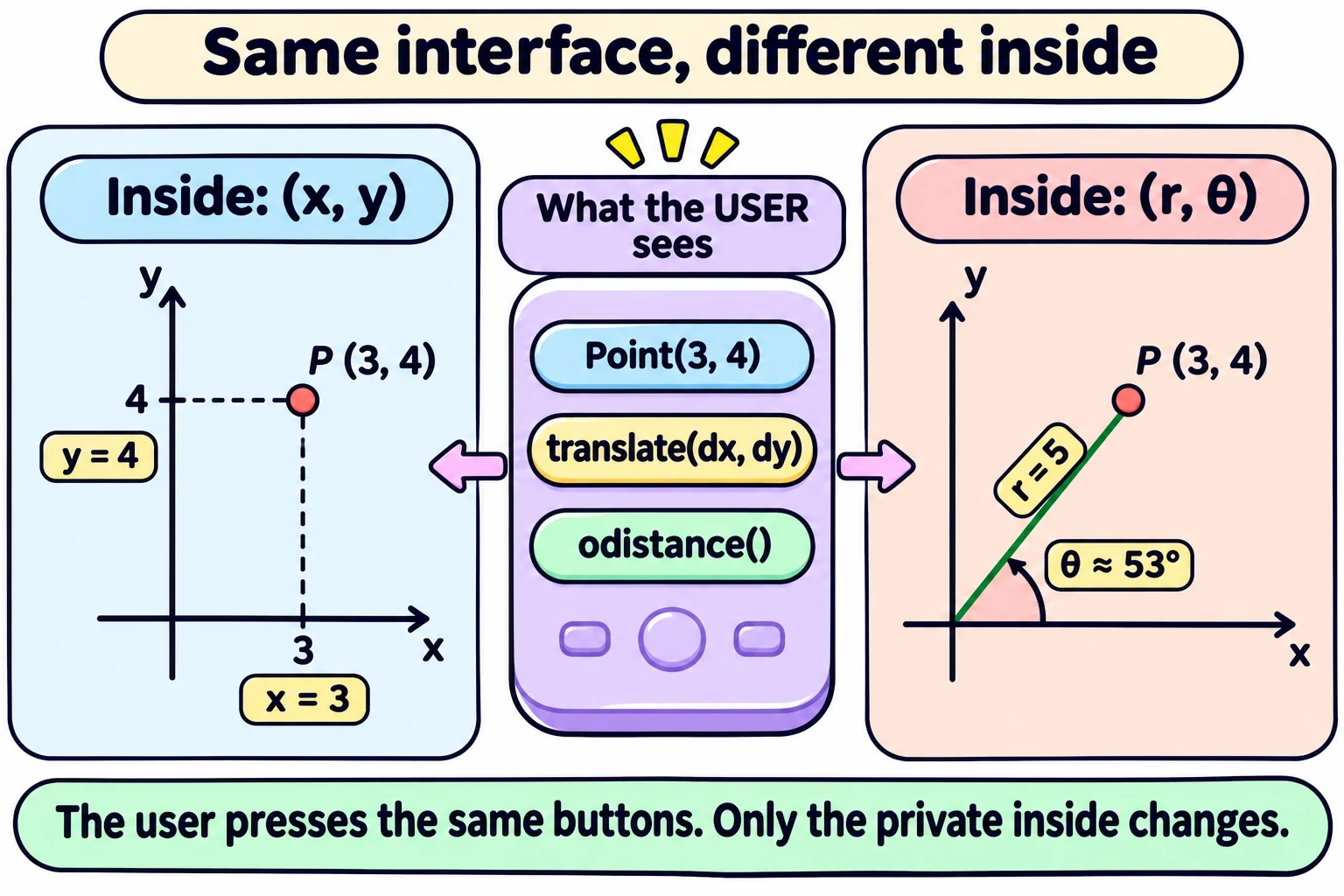
| Task | (x, y) version | (r, θ) version |
|---|---|---|
odistance() | Needs a square root each time | Just returns r — faster |
translate() | Just add Δx, Δy — easy | Convert to (x, y), shift, convert back — more work |
So each representation is good at different things. That is a choice the programmer makes privately.
Careful — a bug in the lecture's polar code.
math.atan(y/x)only gives angles between −90° and +90°. So for points on the left side (x < 0), and for points straight down, the angle comes out wrong. We tested it:Point(-3, 4)gets stored as if it were (3, −4), andPoint(0, -5)becomes (0, 5). The correct tool ismath.atan2(y, x), which handles all four quadrants:self.theta = math.atan2(b, a). (It also handles x = 0 by itself, so theifis not needed.) The main lesson — same interface, different inside — is still correct.
Special functions (magic methods)
Python has special method names with two underscores on each side. Python calls them for you at the right moment.
| Method | Called automatically when you... | Example |
|---|---|---|
__init__() | create an object | p = Point(3, 4) |
__str__() | convert to a string: str(p) or print(p) | print(p) shows (3,4) |
__add__() | use + | p1 + p2 |
__mul__() | use * | p1 * p2 |
__lt__() | use < | p1 < p2 |
__ge__() | use >= | p1 >= p2 |
(The lecture slide writes it as mult; the real Python name is __mul__ — __mult__ would never be called by *.)
class Point:
    ...
    def __str__(self):
        return '(' + str(self.x) + ',' + str(self.y) + ')'

    def __add__(self, p):
        return Point(self.x + p.x, self.y + p.y)
p1 = Point(1, 2)
p2 = Point(3, 4)
print(p1 + p2) # Python calls p1.__add__(p2) → Point(4, 6), then __str__ → (4,6)Without __str__, print(p1) would show something unhelpful like <__main__.Point object at 0x7f...>.
In one line: A class is a template that bundles data with its functions; objects are its instances; keep the interface fixed so the inside can change freely.
Exam words: abstract data type, class, object, instance, __init__ (constructor), self, default arguments, interface vs implementation, __str__, __add__, polar coordinates.
Quick check
1. What is the difference between a class and an object?
A class is the template; an object is one real thing made from it. One class can make many objects.2. p = Point() — what are p.x and p.y (x, y version)?
Both 0, because of the default values a=0, b=0.3. p = Point(6, 8). What is p.odistance()?
√(6×6 + 8×8) = √(36 + 64) = √100 = 10.0.4. p = Point(2, 5); p.translate(-2, 1). Where is p now?
(2 + (−2), 5 + 1) = (0, 6).5. Which method does print(p) call?
__str__().