
Quicksort
Start here Merge sort is fast (O(n log n)), but it needs an extra list for merging. Quicksort (invented by Tony Hoare) is also divide and conquer — but it does the hard work before splitting, so there is nothing to merge, and it can sort in place (inside the same list).
Why merge sort has to merge
Merge sort needs extra memory and recursion. Why does it need to merge at all?
Because after splitting, some small values are stuck in the right half and some big values in the left half. The merge step moves them across.
Example: [0, 2, 4, 6, 1, 3, 5, 9]. Left half = 0, 2, 4, 6. Right half = 1, 3, 5, 9. Even after sorting both halves, 1 and 3 must move to the left of 4 and 6.
Big idea: what if we split so that everything on the left is smaller than everything on the right? Then after sorting both parts, the list is already sorted. No merge needed!
Divide and conquer without merging
If we knew the median m (the middle value):
- Move all values ≤ m to the left, all values > m to the right. (One pass: O(n).)
- Recursively sort the left part and the right part.
- Done — the whole list is sorted.
Time: T(n) = 2T(n/2) + n → O(n log n), just like merge sort.
The problem: to find the median we would have to sort the list first — which is the job we are trying to do!
The trick: don't insist on the median. Just pick some value from the list. It is called the pivot. Split the list around the pivot.
Quicksort — the steps
- Choose a pivot. Usually the first element.
- Partition: rearrange the list into Lower (values ≤ pivot) and Upper (values > pivot).
- Move the pivot between the Lower and Upper parts. Now the pivot is in its final sorted position.
- Recursively sort the Lower part and the Upper part.
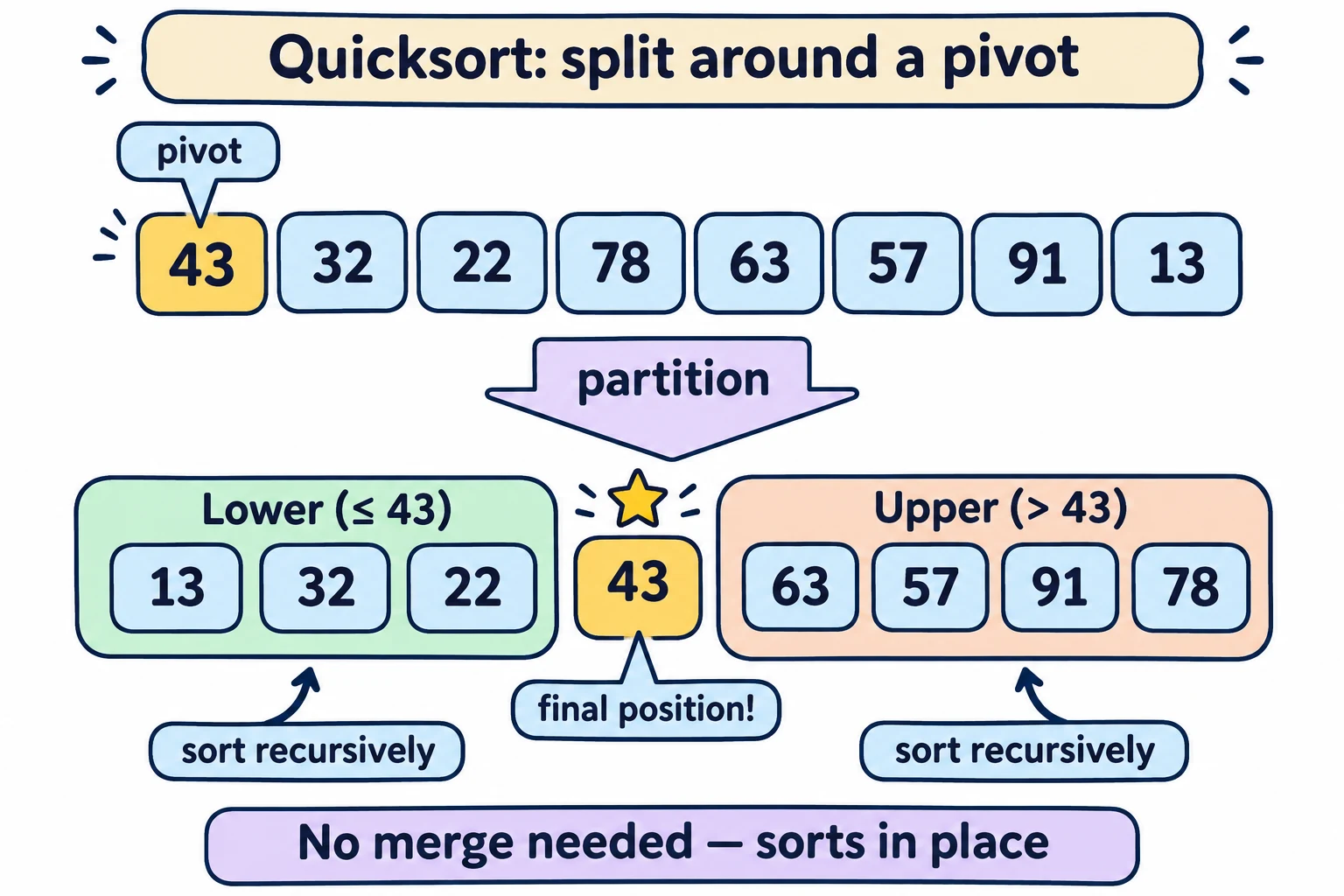
Everyday example: A teacher sorting answer sheets by marks picks one sheet with 43 marks. She makes a "below or equal to 43" pile and an "above 43" pile, with that sheet in between. Then each pile is sorted the same way. When both piles are sorted, everything is in order — no combining needed.
Partitioning in one pass — how it really works
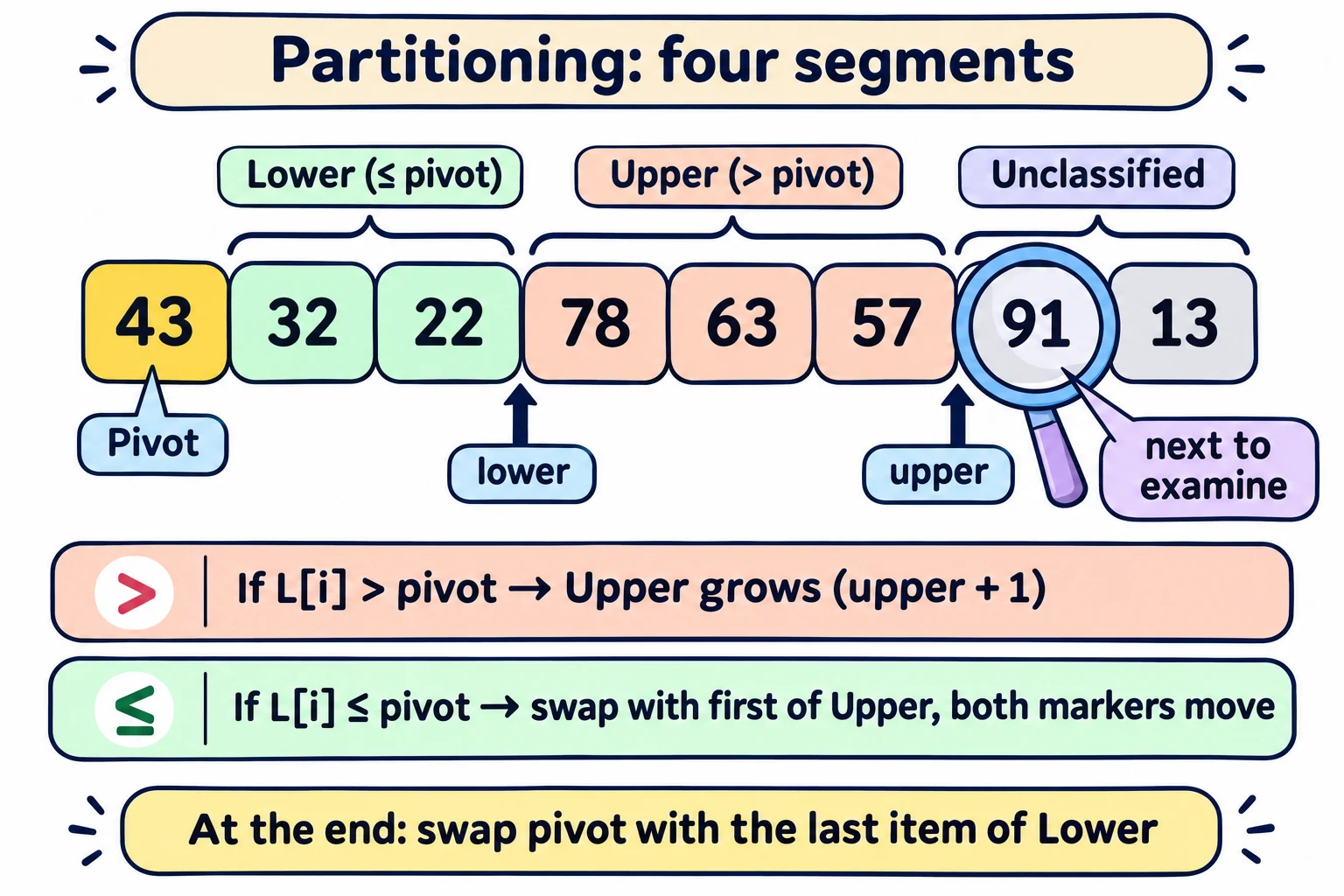
We scan the list from left to right. At any moment the list has four segments:
| Segment | Holds |
|---|---|
| Pivot | The first element (position l) |
| Lower | Values already seen that are ≤ pivot |
| Upper | Values already seen that are > pivot |
| Unclassified | Values not looked at yet |
Two markers keep track: lower = where Lower ends (first position after Lower), upper = where Upper ends.
For each unclassified value L[i]:
- If L[i] > pivot: it belongs to Upper. Just move the
uppermarker one step right (Upper grows). - If L[i] ≤ pivot: it belongs to Lower. Swap it with the first item of Upper. Now Lower grows by one, and Upper shifts one step right.
At the end, swap the pivot with the last item of Lower. Now the order is: Lower, pivot, Upper.
Full trace — partition [43, 32, 22, 78, 63, 57, 91, 13]
Pivot = 43. Start: lower = 1, upper = 1 (both segments empty).
| i | L[i] | Compare with 43 | Action | List after | lower | upper |
|---|---|---|---|---|---|---|
| 1 | 32 | ≤ 43 | swap with first of Upper (itself) → Lower grows | 43 | 32 | | 22 78 63 57 91 13 | 2 | 2 |
| 2 | 22 | ≤ 43 | same → Lower grows | 43 | 32 22 | | 78 63 57 91 13 | 3 | 3 |
| 3 | 78 | > 43 | Upper grows | 43 | 32 22 | 78 | 63 57 91 13 | 3 | 4 |
| 4 | 63 | > 43 | Upper grows | 43 | 32 22 | 78 63 | 57 91 13 | 3 | 5 |
| 5 | 57 | > 43 | Upper grows | 43 | 32 22 | 78 63 57 | 91 13 | 3 | 6 |
| 6 | 91 | > 43 | Upper grows | 43 | 32 22 | 78 63 57 91 | 13 | 3 | 7 |
| 7 | 13 | ≤ 43 | swap 13 with 78 (first of Upper) | 43 | 32 22 13 | 63 57 91 78 | 4 | 8 |
Finally, swap the pivot 43 with the last item of Lower (13, at position 3):
[13, 32, 22, 43, 63, 57, 91, 78]
- Pivot 43 is at position 3 — its final place.
- Left of it: 13, 32, 22 (all ≤ 43). Right of it: 63, 57, 91, 78 (all > 43).
- Now recursively sort [13, 32, 22] and [63, 57, 91, 78].
(The lecture slide draws the upper part as "78 63 57 91". The exact order inside Upper depends on the swaps; with this code it comes out as 63 57 91 78. Either way, everything in Upper is > 43, which is all that matters.)
The code
def quicksort(L, l, r):            # sort the slice L[l:r]
    if (r - l <= 1):               # 0 or 1 item: already sorted
        return L
    (pivot, lower, upper) = (L[l], l+1, l+1)
    for i in range(l+1, r):
        if L[i] > pivot:           # extend the Upper segment
            upper = upper + 1
        else:                      # exchange L[i] with the start of Upper
            (L[i], L[lower]) = (L[lower], L[i])
            # shift both segments
            (lower, upper) = (lower+1, upper+1)
    # move the pivot between Lower and Upper
    (L[l], L[lower-1]) = (L[lower-1], L[l])
    lower = lower - 1
    # recursive calls
    quicksort(L, l, lower)          # sort Lower
    quicksort(L, lower+1, upper)    # sort Upper
    return L
Call it as quicksort(L, 0, len(L)) to sort the whole list.
| Variable | Meaning |
|---|---|
l, r | Sort the part L[l:r] — from position l up to (not including) r |
pivot | L[l], the first element of this part |
lower | First position after the Lower segment |
upper | First position after the Upper segment |
| After the loop | lower − 1 is where the pivot ends up |
Why it's "in place": it only swaps items inside L. No new list is created (unlike merge sort).
Other partition strategies
The method above is one of many. Another popular one builds Lower from the left end and Upper from the right end, and the two meet in the middle. Every version keeps the same promise: Lower ≤ pivot < Upper.
In one line: Quicksort picks a pivot, partitions the list in one pass into Lower (≤ pivot) and Upper (> pivot), puts the pivot between them, and sorts each side — no merge, in place.
Exam words: quicksort, pivot, partition, Lower segment, Upper segment, unclassified, in place, divide and conquer without merging, Hoare.
Quick check
1. What is the main advantage of quicksort over merge sort?
No merge step, so no extra list is needed — quicksort sorts in place.2. Partition [5, 8, 2, 9, 1] with pivot 5 using the lecture's method. What is the list after moving the pivot?
i=1: 8 > 5 → Upper [8]. i=2: 2 ≤ 5 → swap with 8 → [5, 2, 8, 9, 1], Lower [2]. i=3: 9 > 5 → Upper [8, 9]. i=4: 1 ≤ 5 → swap with 8 → [5, 2, 1, 9, 8]. Swap pivot with last of Lower (1): [1, 2, 5, 9, 8]. Pivot 5 is at position 2.3. After one partition, which element is guaranteed to be in its final sorted position?
The pivot.4. Why don't we use the median as the pivot?
Finding the median needs the list sorted (or extra work) — that's the problem we are trying to solve. So we just pick some element, like the first one.5. What does quicksort(L, 2, 5) sort?
Only the part L[2:5] — positions 2, 3 and 4.Try Interactive Playground
See how a pivot divides a list into Lower and Upper regions.
Start in Manual mode. Read each card, make your prediction, then choose Show next step when you are ready.
Ready: choose Next to trace Quick Sort.
Why? We begin with the exact list you entered, so you can follow every change.
- quick_sort(A, left, right)
- if left >= right: return
- pivot = A[left]
- for each item after pivot:
- if item > pivot: put it in Upper
- else: put it in Lower
- place pivot between Lower and Upper
- sort both regions
Before you continue
Look at the highlighted item. What should the algorithm do next?
Complexity
Best/average: O(n log n); worst: O(n²); stack space: O(log n) average.