
Lists and Arrays in Python — and NumPy
Start here Python calls its built-in sequence a "list". But is it a linked list like the one we just built? No! Underneath, a Python list is an array that grows when needed. This page explains how that works, why
appendis fast butinsertis slow, a classic trap with 2D lists, and the NumPy library for real arrays.
How Python lists really work
Python lists are not linked lists. The Python interpreter stores a list in an array:
- When you create a list, Python reserves a fixed block of slots (a little more than you need).
- It remembers how many slots are actually used (the last position of the list).
- When the block is full and you append again, Python grabs a bigger block and copies everything over.
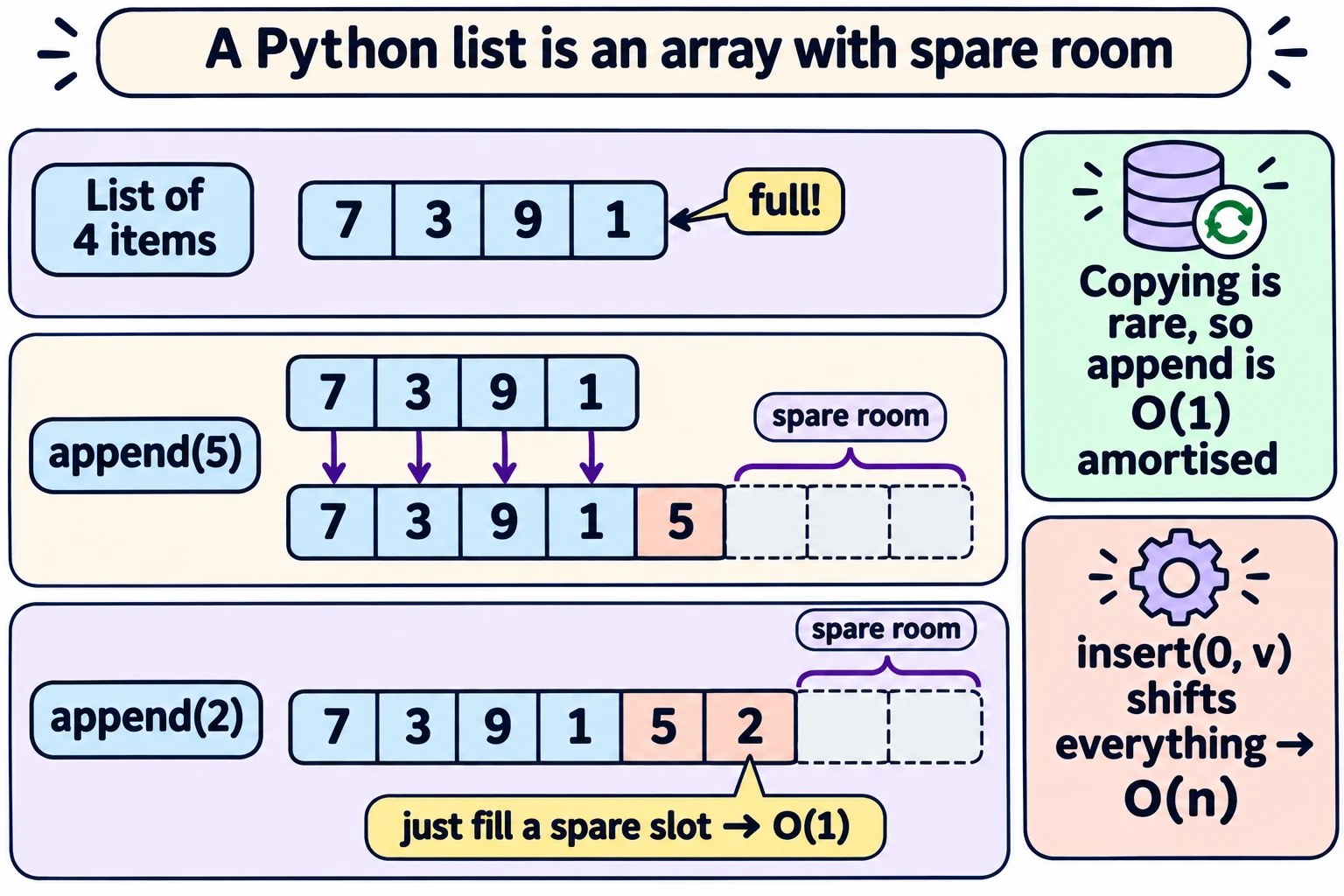
The lecture says Python doubles the size when the list overflows. That's the easiest way to understand it. (In the real CPython implementation, the extra room is smaller — roughly 12% more each time. We measured the capacities: 4, 8, 16, 24, 32, 40, 52, 64, 76, ... The idea is the same: grow by a fraction of the current size, not by a fixed number of slots.)
Why append is O(1) "amortised"
- Most appends just fill the next spare slot: O(1).
- Once in a while, the block is full, and Python copies all n items: O(n) for that one append.
- Because the block grows by a fraction of its size, these expensive copies are rare. Spread over all the appends, the extra cost per append is a constant.
So l.append(v) and l.pop() (remove the last item) are O(1) amortised — "amortised" means averaged over a long sequence of operations.
Everyday example: You pay ₹1200 for a yearly bus pass. The day you buy it is expensive, but averaged over 365 days it's only about ₹3.30 a day. That averaging is what "amortised" means.
Python list operation costs
| Operation | Time | Why |
|---|---|---|
l[i], l[i] = v | O(1) | Array: compute the position directly |
l.append(v) | O(1) amortised | Fill a spare slot (rarely, copy to a bigger block) |
l.pop() | O(1) | Remove the last item |
l.insert(0, v) or l.insert(i, v) | O(n) | All items after i shift right |
l.pop(0), del l[i] | O(n) | All items after i shift left |
v in l | O(n) | Must scan the list |
Effectively, Python lists behave more like arrays than linked lists: append is cheap, insert in the middle is expensive.
2D lists (matrices) — the aliasing trap
A matrix like
| 0 | 1 |
|---|---|
| 1 | 0 |
is written in Python as a list of lists: [[0, 1], [1, 0]].
Be careful when you create a matrix:
zerolist = [0, 0, 0]
zeromatrix = [zerolist, zerolist, zerolist]
zeromatrix[1][1] = 1
print(zeromatrix)
You expect only the middle to change. But the output is:
[[0, 1, 0], [0, 1, 0], [0, 1, 0]]Why? All three rows are the same list object zerolist. Changing it through one row changes "all three" — because there is really only one row with three names. This is called aliasing (different names for the same mutable object).
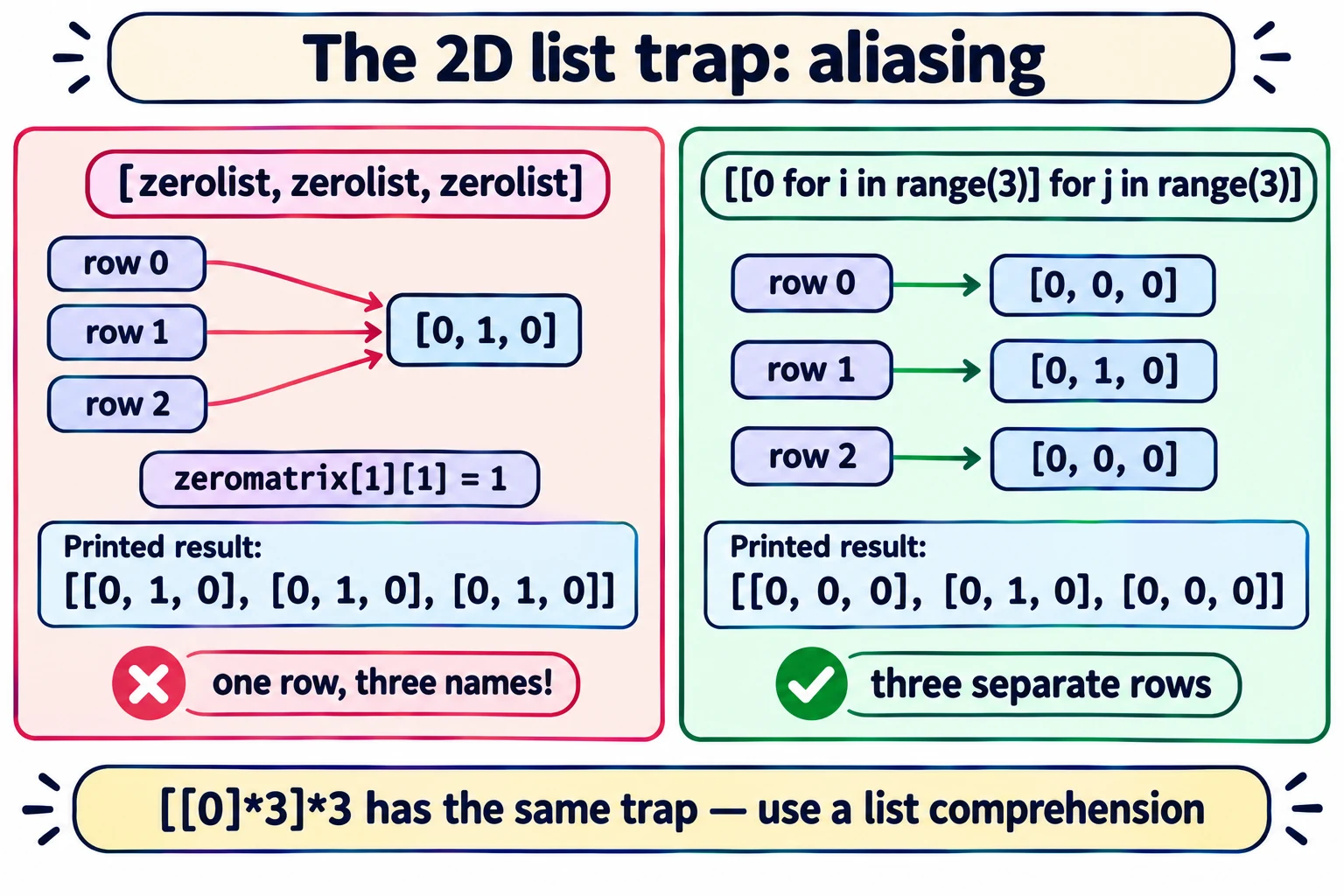
The same trap happens with [[0]3]3. We tested it: after setting [1][1] = 1, it also prints [[0, 1, 0], [0, 1, 0], [0, 1, 0]].
Fix: use a list comprehension — it builds a new row each time:
zeromatrix = [ [ 0 for i in range(3) ] for j in range(3) ]
zeromatrix[1][1] = 1
print(zeromatrix)        # [[0, 0, 0], [0, 1, 0], [0, 0, 0]]  ✔
(Note: [0]*3 alone is fine for one row, because 0 is an immutable number. The problem is only when you repeat a list object.)
NumPy arrays
The NumPy library gives Python real arrays, designed for numbers and matrices. It is used everywhere in data science.
import numpy as np

zeromatrix = np.zeros(shape=(3,3))          # 3×3 matrix of zeros
identitymatrix = np.array([[1,0],[0,1]])    # make an array from a list
row2 = np.arange(5)                         # like range: [0 1 2 3 4]
You can work on a whole matrix at once — no loops needed:
A = np.array([[1, 2], [3, 4]])
B = np.array([[0, 1], [1, 0]])

C = 3*A + B           # [[ 3  7]
                      #  [10 12]]
D = np.matmul(A, B)   # true matrix multiplication:
                      # [[2 1]
                      #  [4 3]]
Check one entry of 3*A + B: top-left = 3 × 1 + 0 = 3 ✔. Check matmul top-left: row 1 of A · column 1 of B = 1×0 + 2×1 = 2 ✔.
*Careful —
AB is NOT matrix multiplication in NumPy. It multiplies entry by entry*:AB gives[[0 2] [3 0]]. For matrix multiplication usenp.matmul(A, B)(orA @ B).
| Python list of lists | NumPy array | |
|---|---|---|
| Create a 3×3 zero matrix | [[0 for i in range(3)] for j in range(3)] | np.zeros(shape=(3,3)) |
| Add two matrices | Write nested loops | A + B |
| Multiply matrices | Three nested loops (O(n³) code from Week 2) | np.matmul(A, B) |
| Speed for number crunching | Slow | Much faster (runs in optimised C code) |
In one line: Python lists are arrays that grow by reserving extra room (append O(1) amortised, insert O(n)); build 2D lists with comprehensions to avoid aliasing; use NumPy for real matrix work.
Exam words: Python list = array underneath, over-allocation, amortised O(1), append, pop, insert O(n), list of lists, aliasing, mutability, list comprehension, NumPy, np.zeros, np.array, np.arange, np.matmul.
Quick check
1. Which is faster on a long Python list: l.append(5) or l.insert(0, 5)? Why?
append — O(1) amortised. insert(0, 5) must shift every item one place right: O(n).2. What does this print?
<pre>row = [0, 0] m = [row, row] m[0][0] = 9 print(m)</pre></summary><b>[[9, 0], [9, 0]]</b> — both rows are the same list object (aliasing).</details>
3. Write a list comprehension for a 2 × 4 matrix of zeros (2 rows, 4 columns).
[[0 for i in range(4)] for j in range(2)]4. What does "amortised O(1)" mean for append?
Most appends cost O(1); a few cost O(n) (copying to a bigger block). Averaged over many appends, the cost per append is a constant.5. A = np.array([[1,2],[3,4]]). What is A * A, and what is np.matmul(A, A)?
A * A = [[1 4] [9 16]] (entry by entry). np.matmul(A, A) = [[7 10] [15 22]].