
Ready to begin
No records have been processed. Start with Next step.
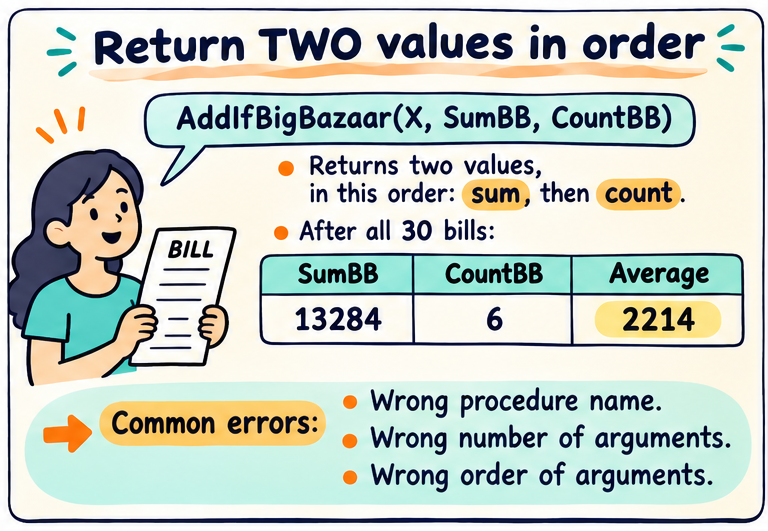
A procedure call must match its definition. Tutorial 3.3 builds an average for Big Bazaar bills by returning two updated values after each card. The procedure name, number of arguments and argument order all matter.
Procedure AddIfBigBazaar(X, SumBB, CountBB)
    if (X.Store == "Big Bazaar") {
        SumBB = SumBB + X.BillAmount
        CountBB = CountBB + 1
    }
    return (SumBB, CountBB)
End Procedure

SumBB = 0; CountBB = 0
for each row X in Bills {
    (SumBB, CountBB) = AddIfBigBazaar(X, SumBB, CountBB)
}
if (CountBB > 0) { AverageBB = SumBB / CountBB }
else { report "No matching bills" }Read the current record, check the explanation, and watch the variables. Use Back to revisit any step.
Ready
No records have been processed. Start with Next step.
Start at the first step. Watch the current row and the values we remember.
| Error | Why it fails |
|---|---|
| AddingIfBigBazaar(X,SumBB,CountBB) | The name differs from the definition AddIfBigBazaar. |
| AddIfBigBazaar(X,SumBB) | A required argument is missing. |
| AddIfBigBazaar(X,SumBB,CountBB,AverageBB) | There is an extra argument. |
| AddIfBigBazaar(X,CountBB,SumBB) | Sum and count occupy the wrong positions. |
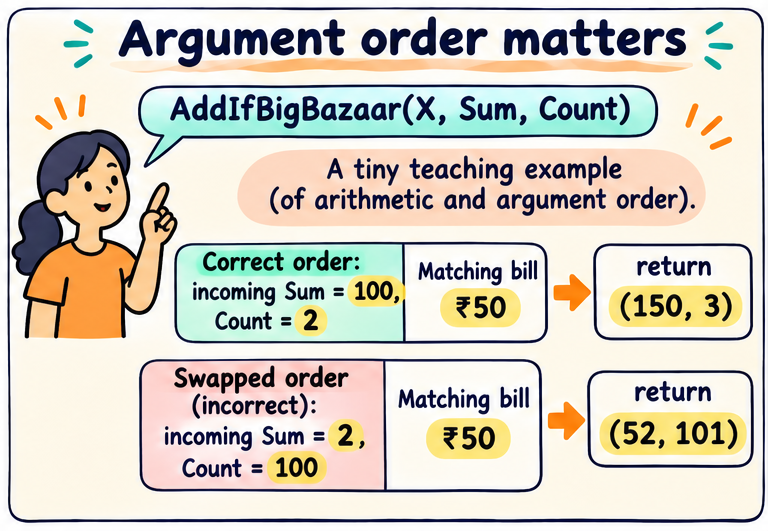
Imagine the current sum is 100 and count is 2, and a matching bill is₹50. The correct call returns(150,3). Swapping the arguments makes the helper treat 2 as the sum and 100 as the count: it returns(52,101), which is nonsense for our intended task.
If the bill is not from Big Bazaar, return the incoming sum and count unchanged. A local update is not a promise that the caller’s variables changed automatically; the caller explicitly assigns both returned values. The final values for our data are SumBB=13,284 and CountBB=6, so AverageBB=2,214.
Tuple notation (SumBB,CountBB) is used here to show two returned values in a fixed order. It does not mean that sum and count are interchangeable.
What are the final Big Bazaar sum and count?
₹13,284 and 6 bills.
Why is calling AddingIfBigBazaar an error?
It is not the defined procedure name AddIfBigBazaar.
Correct incoming values are 100 and 2; bill amount 50. What is returned?
(150,3), in the order sum then count.
Must a nonmatching bill reset the counters to zero?
No. It should return the existing values unchanged.
What should happen when no Big Bazaar bills exist?
CountBB is zero, so do not divide. Report that no matching bills exist.